> ## Documentation Index
> Fetch the complete documentation index at: https://xata.io/docs/llms.txt
> Use this file to discover all available pages before exploring further.
# Replication to webhooks
## Introduction
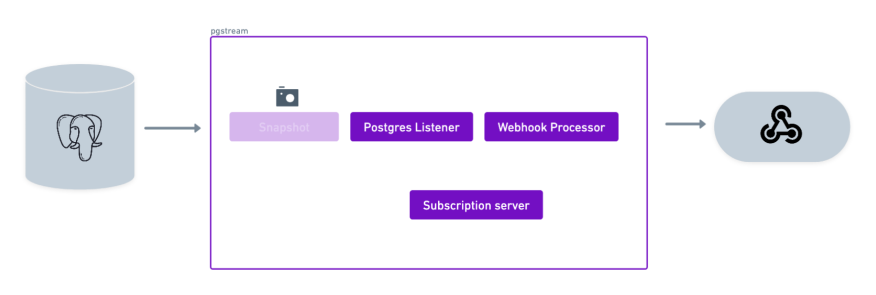
This tutorial will showcase the use of pgstream to replicate data from a PostgreSQL database to a webhook server. You can also check out this [blogpost](https://xata.io/blog/postgres-webhooks-with-pgstream) explaining how to use pgstream with webhooks.
### Requirements
* A source PostgreSQL database
* A target webhook server
* pgstream (see [installation](/opensource/pgstream/docs/cli#installation) instructions for more details)
### Demo
## Environment setup
The first step is to start the PostgreSQL database that will be used as source for replication. The `pgstream` repository provides a docker installation that will be used for the purposes of this tutorial, but can be replaced by any available PostgreSQL server, as long as it has [`wal2json`](https://github.com/eulerto/wal2json) installed.
To start the docker provided PostgreSQL server, run the following command:
```sh theme={null}
docker-compose -f build/docker/docker-compose.yml --profile pg2webhook up
```
This will start a PostgreSQL databases on port `5432`.
## Database initialisation
Once the PostgreSQL server is up and running, the next step is to initialise pgstream. This will create the `pgstream` schema in the configured Postgres database, along with the tables/functions/triggers required to keep track of the schema changes. See [Tracking schema changes](/opensource/pgstream/docs/architecture#tracking-schema-changes) section for more details. This step will also create a replication slot on the source database which will be used by the pgstream service.
The initialisation step allows to provide both the URL of the PostgreSQL database and the name of the replication slot to be created. The PostgreSQL URL is required, but the replication slot name is optional. If not provided, it will default to `pgstream__slot`, where `` is the name of the PostgreSQL database. The configuration can be provided either by using the CLI supported parameters, or using the environment variables.
For this tutorial, we'll create a replication slot with the name `pgstream_tutorial_slot`.
* Using the `--init` flag in the `run` command
* Using CLI parameters:
```sh theme={null}
pgstream init --postgres-url "postgres://postgres:postgres@localhost:5432?sslmode=disable" --replication-slot pgstream_tutorial_slot
```
* Using environment variables:
```sh theme={null}
PGSTREAM_POSTGRES_REPLICATION_SLOT_NAME=pgstream_tutorial_slot PGSTREAM_POSTGRES_LISTENER_URL=postgres://postgres:postgres@localhost:5432?sslmode=disable pgstream init
```
Successful initialisation should prompt the following message:
```
SUCCESS pgstream initialisation complete
```
If at any point the initialisation performed by pgstream needs to be reverted, all state will be removed by running the `destroy` CLI command.
```sh theme={null}
pgstream destroy --postgres-url "postgres://postgres:postgres@localhost:5432?sslmode=disable" --replication-slot pgstream_tutorial_slot
```
## Prepare `pgstream` configuration
### Listener
In order to run pgstream, we need to provide the configuration required to run the PostgreSQL to webhook server replication. First, we configure the listener module that will be listening to the WAL on the source PostgreSQL database. This requires the PostgreSQL database URL, which will be the one from the docker PostgreSQL server we started and setup in the previous steps.
```sh theme={null}
PGSTREAM_POSTGRES_LISTENER_URL="postgres://postgres:postgres@localhost:5432?sslmode=disable"
```
Since we've set a custom replication slot name, the configuration variable needs to be set accordingly so that it doesn't use the default value.
```sh theme={null}
PGSTREAM_POSTGRES_REPLICATION_SLOT_NAME=pgstream_tutorial_slot
```
The PostgreSQL WAL listener can be configured to perform an initial snapshot of the existing PostgreSQL database tables before starting to listen on the replication slot. In this case, we have no existing tables, so we don't need to configure the initial snapshot.
However, if there were tables with pre-existing data that we wanted to replicate to the webhooks server, we could configure it by setting the following environment variables:
```sh theme={null}
# URL of the PostgreSQL database we want to snapshot
PGSTREAM_POSTGRES_SNAPSHOT_STORE_URL="postgres://postgres:postgres@localhost:5432?sslmode=disable"
# List of tables we want to snapshot. If the tables are not schema qualified, the public schema will be assumed.
# Wildcards are supported.
#
# The following example will snapshot all tables in the `test_schema` and the table `test` from the public schema.
PGSTREAM_POSTGRES_SNAPSHOT_TABLES="test_schema.* test"
```
Further configuration can be provided to optimize the performance of the snapshot process. For more information, check the [snapshot tutorial](/opensource/pgstream/docs/tutorials/postgres_snapshot#listener).
### Processor
With the listener side ready, the next step is to configure the processor. Since we want to replicate to a webhook server, we need to configure the webhooks processor. The webhooks processor runs a server that accepts webhook subscriptions, to keep track of which webhooks need to be called when an event is received. We need to configure where we want that subscriptions table to be stored, usually the source database will be a good option.
```sh theme={null}
PGSTREAM_WEBHOOK_SUBSCRIPTION_STORE_URL="postgres://postgres:postgres@localhost:5432?sslmode=disable"
```
The subscription store can be configured to use caching, to minimise the number of calls we make to the database, since this would need to be called on a per event basis, which can be a lot in high traffic workloads. It is also helpful if the subscriptions don't change often, since the cache would be up to date most of the time.
```sh theme={null}
PGSTREAM_WEBHOOK_SUBSCRIPTION_STORE_CACHE_ENABLED=true
# How often the subscription store cache will retrieved all subscriptions from the sql store, and update its state. In the worst case scenario, this represent the staleness of the cache. Defaults to 60s.
PGSTREAM_WEBHOOK_SUBSCRIPTION_STORE_CACHE_REFRESH_INTERVAL="60s"
```
Save the configuration in a file named `pg2webhook_tutorial.env`. An equivalent `pg2webhook_tutorial.yaml` configuration can be found below the environment one, and can be used interchangeably.
* Without initial snapshot
```sh theme={null}
# Listener config
PGSTREAM_POSTGRES_LISTENER_URL="postgres://postgres:postgres@localhost:5432?sslmode=disable"
PGSTREAM_POSTGRES_REPLICATION_SLOT_NAME=pgstream_tutorial_slot
# Processor config
PGSTREAM_WEBHOOK_SUBSCRIPTION_STORE_URL="postgres://postgres:postgres@localhost:5432?sslmode=disable"
PGSTREAM_WEBHOOK_SUBSCRIPTION_STORE_CACHE_ENABLED=true
PGSTREAM_WEBHOOK_SUBSCRIPTION_STORE_CACHE_REFRESH_INTERVAL="60s"
```
```yaml theme={null}
source:
postgres:
url: "postgres://postgres:postgres@localhost:5432?sslmode=disable"
mode: replication # options are replication, snapshot or snapshot_and_replication
replication:
replication_slot: pgstream_tutorial_slot
target:
webhooks:
subscriptions:
store:
url: "postgres://postgres:postgres@localhost:5432?sslmode=disable" # URL of the database where the webhook subscriptions are stored
cache:
enabled: true # whether to enable caching for the subscription store
refresh_interval: 60 # interval in seconds to refresh the cache
modifiers:
injector:
enabled: true # whether to inject pgstream metadata into the WAL events
```
* With initial snapshot
```sh theme={null}
# Listener config
PGSTREAM_POSTGRES_LISTENER_URL="postgres://postgres:postgres@localhost:5432?sslmode=disable"
PGSTREAM_POSTGRES_REPLICATION_SLOT_NAME=pgstream_tutorial_slot
PGSTREAM_POSTGRES_SNAPSHOT_STORE_URL="postgres://postgres:postgres@localhost:5432?sslmode=disable"
# Initial snapshot of all tables in the public schema
PGSTREAM_POSTGRES_SNAPSHOT_TABLES="*"
# Processor config
PGSTREAM_WEBHOOK_SUBSCRIPTION_STORE_URL="postgres://postgres:postgres@localhost:5432?sslmode=disable"
PGSTREAM_WEBHOOK_SUBSCRIPTION_STORE_CACHE_ENABLED=true
PGSTREAM_WEBHOOK_SUBSCRIPTION_STORE_CACHE_REFRESH_INTERVAL="60s"
```
```yaml theme={null}
source:
postgres:
url: "postgres://postgres:postgres@localhost:5432?sslmode=disable"
mode: replication # options are replication, snapshot or snapshot_and_replication
replication:
replication_slot: pgstream_tutorial_slot
snapshot: # when mode is snapshot or snapshot_and_replication
mode: full # options are data_and, schema or data
tables: ["*"] # tables to snapshot, can be a list of table names or a pattern
recorder:
repeatable_snapshots: true # whether to repeat snapshots that have already been taken
postgres_url: "postgres://postgres:postgres@localhost:5432?sslmode=disable" # URL of the database where the snapshot status is recorded
schema: # when mode is full or schema
pgdump_pgrestore:
clean_target_db: false # whether to clean the target database before restoring
target:
webhooks:
subscriptions:
store:
url: "postgres://postgres:postgres@localhost:5432?sslmode=disable" # URL of the database where the webhook subscriptions are stored
cache:
enabled: true # whether to enable caching for the subscription store
refresh_interval: 60 # interval in seconds to refresh the cache
modifiers:
injector:
enabled: true # whether to inject pgstream metadata into the WAL events
```
## Validate `pgstream` status
We can validate that the initialisation and the configuration are valid by running the `status` command before starting `pgstream`.
```sh theme={null}
# using yaml configuration file
./pgstream status -c pg2webhook_tutorial.yaml
# using env configuration file
./pgstream status -c pg2webhook_tutorial.env
```
```sh theme={null}
SUCCESS pgstream status check encountered no issues
Initialisation status:
- Pgstream schema exists: true
- Migration current version: 7
- Migration status: success
- Replication slot name: pgstream_tutorial_slot
- Replication slot plugin: wal2json
- Replication slot database: postgres
Config status:
- Valid: true
Transformation rules status:
- Valid: true
Source status:
- Reachable: true
```
## Run `pgstream`
With the configuration ready, we can now run pgstream. In this case we set the log level as trace to provide more context for debugging and have more visibility into what pgstream is doing under the hood.
```sh theme={null}
# with initialization
pgstream run -c pg2webhook_tutorial.env --init --log-level trace
# with the environment configuration
pgstream run -c pg2webhook_tutorial.env --log-level trace
# with the yaml configuration
pgstream run -c pg2webhook_tutorial.yaml --log-level trace
```
Once pgstream is running, we need to make sure the webhook server we want to use is started and ready to accept requests. For the purposes of this tutorial, we will use a dummy webhook server provided in this repository, under the `/tools/webhook` directory, which will listen on `localhost:9910`. This dummy webhook server just prints the events received to output in JSON format for validation.
```sh theme={null}
cd tools/webhook
go build
./webhook
```
```sh theme={null}
2025-03-13T10:31:44.18911+01:00 INF logger.go:37 > listening on :9910...
```
Once we have pgstream and the webhook server running, all we need to do is register a subscription to the events we're interested in for our dummy webhook server. The subscriptions server that the pgstream webhook processor runs exposes the endpoint `http://localhost:9900/webhooks/subscribe`, so that's where we should send the requests. In this example we'll subscribe to insert events for all tables.
```sh theme={null}
curl -d '{"url": "http://localhost:9910/webhook", "event_types":["I"]}' -H "Content-Type: application/json" -X POST http://localhost:9900/webhooks/subscribe
```
The supported events are `I`(insert), `U`(update), `D`(delete) and `T`(truncate). If no events are provided, all will be included. We can also subscribe to a specific schema or table by providing them in the request body. If they are not provided, all will be included.
For example, if we wanted to subscribe to all events for the `test` table of the `public` schema, the request would look like this:
```sh theme={null}
curl -d '{"url": "http://localhost:9910/webhook", "schema": "public", "table": "test"}' -H "Content-Type: application/json" -X POST http://localhost:9900/webhooks/subscribe
```
Once we have sent the subscription, we can validate that it has been created correctly by connecting to the PostgreSQL database where we configured the `webhook_subscriptions` table to be created. In our case, this is the source PostgreSQL database.
```sh theme={null}
➜ psql postgresql://postgres:postgres@localhost:5432/postgres
```
```sql theme={null}
SELECT * FROM pgstream.webhook_subscriptions;
+-------------------------------+-------------+------------+-------------+
| url | schema_name | table_name | event_types |
|-------------------------------+-------------+------------+-------------|
| http://localhost:9910/webhook | | | ['I'] |
+-------------------------------+-------------+------------+-------------+
```
## Verify webhook events
Now we can start populating the source PostgreSQL database and receiving events in our webhook server.
```sql theme={null}
CREATE TABLE test(id SERIAL PRIMARY KEY, name TEXT);
```
Creating a table will generate an insert event on the `pgstream.schema_log` table that we'll be notified about, since it matches the subscription parameters.
```json theme={null}
{
"Data": {
"action": "I",
"timestamp": "2025-03-13 09:51:31.19715+00",
"lsn": "0/15A1038",
"schema": "pgstream",
"table": "schema_log",
"columns": [
{
"id": "",
"name": "id",
"type": "pgstream.xid",
"value": "cv9al8qhi0j00i9chq80"
},
{
"id": "",
"name": "version",
"type": "bigint",
"value": 1
},
{
"id": "",
"name": "schema_name",
"type": "text",
"value": "public"
},
{
"id": "",
"name": "schema",
"type": "jsonb",
"value": "{\"tables\": [{\"oid\": \"16471\", \"name\": \"test\", \"columns\": [{\"name\": \"id\", \"type\": \"integer\", \"unique\": true, \"default\": \"nextval('public.test_id_seq'::regclass)\", \"metadata\": null, \"nullable\": false, \"pgstream_id\": \"cv9al8qhi0j00i9chq8g-1\"}, {\"name\": \"name\", \"type\": \"text\", \"unique\": false, \"default\": null, \"metadata\": null, \"nullable\": true, \"pgstream_id\": \"cv9al8qhi0j00i9chq8g-2\"}], \"pgstream_id\": \"cv9al8qhi0j00i9chq8g\", \"primary_key_columns\": [\"id\"]}]}"
},
{
"id": "",
"name": "created_at",
"type": "timestamp without time zone",
"value": "2025-03-13 09:51:31.15459"
},
{
"id": "",
"name": "acked",
"type": "boolean",
"value": false
}
],
"identity": null,
"metadata": {
"schema_id": null,
"table_pgstream_id": "",
"id_col_pgstream_id": null,
"version_col_pgstream_id": ""
}
}
}
```
Inserting data into this newly created table will also send an event to our webhook server.
```sql theme={null}
INSERT INTO test(name) VALUES('alice'),('bob'),('charlie');
```
This will generate 3 independent events for each row insert:
```json theme={null}
{
"Data": {
"action": "I",
"timestamp": "2025-03-13 09:52:47.579305+00",
"lsn": "0/15A5C70",
"schema": "public",
"table": "test",
"columns": [
{
"id": "",
"name": "id",
"type": "integer",
"value": 1
},
{
"id": "",
"name": "name",
"type": "text",
"value": "alice"
}
],
"identity": null,
"metadata": {
"schema_id": null,
"table_pgstream_id": "",
"id_col_pgstream_id": null,
"version_col_pgstream_id": ""
}
}
}
```
```json theme={null}
{
"Data": {
"action": "I",
"timestamp": "2025-03-13 09:52:47.579305+00",
"lsn": "0/15A5D58",
"schema": "public",
"table": "test",
"columns": [
{
"id": "",
"name": "id",
"type": "integer",
"value": 2
},
{
"id": "",
"name": "name",
"type": "text",
"value": "bob"
}
],
"identity": null,
"metadata": {
"schema_id": null,
"table_pgstream_id": "",
"id_col_pgstream_id": null,
"version_col_pgstream_id": ""
}
}
}
```
```json theme={null}
{
"Data": {
"action": "I",
"timestamp": "2025-03-13 09:52:47.579305+00",
"lsn": "0/15A5DD8",
"schema": "public",
"table": "test",
"columns": [
{
"id": "",
"name": "id",
"type": "integer",
"value": 3
},
{
"id": "",
"name": "name",
"type": "text",
"value": "charlie"
}
],
"identity": null,
"metadata": {
"schema_id": null,
"table_pgstream_id": "",
"id_col_pgstream_id": null,
"version_col_pgstream_id": ""
}
}
}
```
Any other events will not notify our webhook server.
If we wanted to update our webhook subscription to include those events we can just send another subscription request.
```sh theme={null}
curl -d '{"url": "http://localhost:9910/webhook", "event_types":["I","U","D"]}' -H "Content-Type: application/json" -X POST http://localhost:9900/webhooks/subscribe
```
We should now see the subscriptions table updated accordingly:
```sql theme={null}
SELECT * FROM pgstream.webhook_subscriptions;
+-------------------------------+-------------+------------+-----------------+
| url | schema_name | table_name | event_types |
|-------------------------------+-------------+------------+-----------------|
| http://localhost:9910/webhook | | | ['I', 'U', 'D'] |
+-------------------------------+-------------+------------+-----------------+
```
Those events will now notify our webhook server.
```sql theme={null}
UPDATE test SET name='alice' WHERE name='a';
```
```json theme={null}
{
"Data": {
"action": "U",
"timestamp": "2025-03-13 09:59:27.02505+00",
"lsn": "0/15A62C8",
"schema": "public",
"table": "test",
"columns": [
{
"id": "",
"name": "id",
"type": "integer",
"value": 1
},
{
"id": "",
"name": "name",
"type": "text",
"value": "alice"
}
],
"identity": [
{
"id": "",
"name": "id",
"type": "integer",
"value": 1
}
],
"metadata": {
"schema_id": null,
"table_pgstream_id": "",
"id_col_pgstream_id": null,
"version_col_pgstream_id": ""
}
}
}
```
If we want to have the identity values populated (this is the previous values for the columns of the row being updated/deleted), we can set the `REPLICA IDENTITY` to `FULL`.
```sql theme={null}
ALTER TABLE test REPLICA IDENTITY FULL;
```
With a full replica identity the update event will now contain the old values for all columns. The same would apply for delete events, where a previous value is relevant.
```json theme={null}
{
"Data": {
"action": "U",
"timestamp": "2025-03-13 10:00:47.406957+00",
"lsn": "0/15A8F50",
"schema": "public",
"table": "test",
"columns": [
{
"id": "",
"name": "id",
"type": "integer",
"value": 1
},
{
"id": "",
"name": "name",
"type": "text",
"value": "alice"
}
],
"identity": [
{
"id": "",
"name": "id",
"type": "integer",
"value": 1
},
{
"id": "",
"name": "name",
"type": "text",
"value": "a"
}
],
"metadata": {
"schema_id": null,
"table_pgstream_id": "",
"id_col_pgstream_id": null,
"version_col_pgstream_id": ""
}
}
}
```
## Populate event metadata
In this tutorial we haven't enabled the injector to populate the metadata event information, which is why it appears empty in the events. If the webhook notifier requires that metadata information, the modifiers configuration can be updated to enable the injector. The injector adds pgstream IDs and metadata to the events, which can be useful for tracking and versioning (more details can be found in the [architecture section](/opensource/pgstream/docs/architecture)).
To enable the injector for webhooks, add to the configuration:
```yaml theme={null}
modifiers:
injector:
enabled: true
```
With the injector enabled, the metadata fields in the webhook payloads will be populated with the appropriate pgstream information for each event.
If we now run pgstream again with the updated configuration file, the events will have the metadata populated.
```json theme={null}
{
"Data": {
"action": "U",
"timestamp": "2025-03-13 10:18:29.264688+00",
"lsn": "0/15C1CC0",
"schema": "public",
"table": "tutorial_test",
"columns": [
{
"id": "cv9al8qhi0j00i9chq8g-1",
"name": "id",
"type": "integer",
"value": 1
},
{
"id": "cv9al8qhi0j00i9chq8g-2",
"name": "name",
"type": "text",
"value": "a"
}
],
"identity": [
{
"id": "cv9al8qhi0j00i9chq8g-1",
"name": "id",
"type": "integer",
"value": 1
},
{
"id": "cv9al8qhi0j00i9chq8g-2",
"name": "name",
"type": "text",
"value": "alice"
}
],
"metadata": {
"schema_id": "cv9b12qhi0j00i9chqag",
"table_pgstream_id": "cv9al8qhi0j00i9chq8g",
"id_col_pgstream_id": ["cv9al8qhi0j00i9chq8g-1"],
"version_col_pgstream_id": ""
}
}
}
```
## Troubleshooting
Here are some common issues you might encounter while following this tutorial and how to resolve them:
### 1. **Error: `Connection refused`**
* **Cause:** The PostgreSQL database or webhook server is not running.
* **Solution:**
* Ensure the Docker containers for the PostgreSQL database and webhook server are running.
* Verify the database and webhook server URLs in the configuration.
### 2. **Error: `Replication slot not found`**
* **Cause:** The replication slot was not created during initialization.
* **Solution:**
* Reinitialize `pgstream` or manually create the replication slot.
* Run the `pgstream status` command to validate the initialisation was successful.
* Verify the replication slot exists by running:
```sql theme={null}
SELECT slot_name FROM pg_replication_slots;
```
### 3. **Error: `Webhook events not received`**
* **Cause:** The webhook subscription was not registered correctly.
* **Solution:**
* Verify the subscription by querying the `pgstream.webhook_subscriptions` table:
```sql theme={null}
SELECT * FROM pgstream.webhook_subscriptions;
```
* Ensure the webhook server is running and reachable.
### 4. **Error: `Permission denied`**
* **Cause:** The database user does not have sufficient privileges.
* **Solution:**
* Grant the required privileges to the database user:
```sql theme={null}
GRANT ALL PRIVILEGES ON DATABASE postgres TO postgres;
```
### 5. **Error: `Invalid configuration`**
* **Cause:** The configuration file contains invalid or missing values.
* **Solution:**
* Double-check the `pg2webhook_tutorial.env` file for typos or missing variables.
* Refer to the [pgstream configuration documentation](https://github.com/xataio/pgstream) for details on required variables.
* Run the `pgstream status` command to validate the configuration is correct.
### 6. **Error: `Event metadata not populated`**
* **Cause:** The injector is not enabled in the configuration.
* **Solution:**
* Enable the injector in your configuration:
```yaml theme={null}
modifiers:
injector:
enabled: true
```
* Restart pgstream for the changes to take effect.
### 7. **Error: `Stale webhook subscription cache`**
* **Cause:** The subscription cache is not refreshing frequently enough.
* **Solution:**
* Adjust the cache refresh interval in the configuration:
```sh theme={null}
PGSTREAM_WEBHOOK_SUBSCRIPTION_STORE_CACHE_REFRESH_INTERVAL="30s"
```
If you encounter issues not listed here, consult the [pgstream documentation](https://github.com/xataio/pgstream) or open an issue on the project's GitHub repository.
## Summary
In this tutorial, we successfully configured `pgstream` to replicate data from a PostgreSQL database to a webhook server. We:
1. Set up the source PostgreSQL database and initialized `pgstream`.
2. Configured the listener to capture changes from the PostgreSQL WAL.
3. Configured the processor to send events to a webhook server.
4. Verified that database changes triggered webhook events.
5. Explored how to update webhook subscriptions and use the injector for metadata enrichment.
This tutorial demonstrates how `pgstream` can be used to integrate PostgreSQL with webhook-based systems, enabling real-time event-driven architectures. For more advanced use cases, refer to the other [pgstream tutorials](/opensource/pgstream/overview#tutorials).