

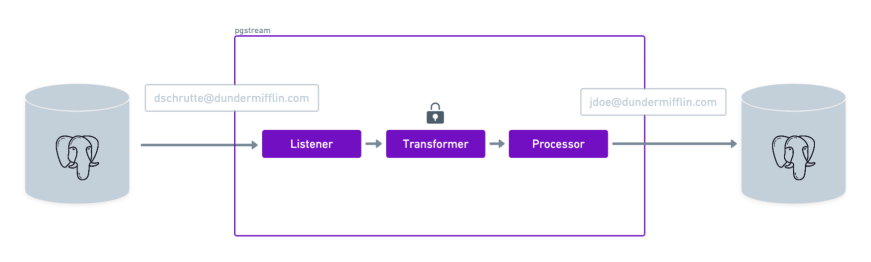
 pgstream supports column value transformations to anonymize or mask sensitive data during replication and snapshots. This is particularly useful for compliance with data privacy regulations.
pgstream integrates with existing transformer open source libraries, such as greenmask, neosync and go-masker, to leverage a large amount of transformation capabilities, as well as having support for custom transformations.
⚠️ Most transformers do not preserve uniqueness. Applying one to a column covered by a unique index or primary key produces duplicate key violations. See Uniqueness and unique indexes.
pgstream supports column value transformations to anonymize or mask sensitive data during replication and snapshots. This is particularly useful for compliance with data privacy regulations.
pgstream integrates with existing transformer open source libraries, such as greenmask, neosync and go-masker, to leverage a large amount of transformation capabilities, as well as having support for custom transformations.
⚠️ Most transformers do not preserve uniqueness. Applying one to a column covered by a unique index or primary key produces duplicate key violations. See Uniqueness and unique indexes.
Uniqueness and unique indexes
Anonymization is lossy by design, and that conflicts directly with unique constraints. Masking609898123456 with masking type id yields 609898****: the transformer keeps a 6 character prefix, so every source value sharing that prefix becomes the same masked value. On a column covered by a unique index the load then fails with duplicate key value violates unique constraint, part way through the data, long after the run started.
Each transformer declares how it behaves with respect to uniqueness:
On an array column the classification describes the whole array transform, which depends on the configured generator. See Array columns.
When a source Postgres URL is configured, pgstream reads the unique indexes, unique constraints and primary keys of every table in the transformation rules and checks them against the configured transformers. Columns with no rule, or with a
noop rule, keep their original value and are never flagged. Run the check on its own with:
lossy transformer on a covered column fails the rules with transformation rules break a unique index, because the target recreates the source’s indexes and the load would hit a duplicate key. With any other target (Kafka, Elasticsearch/OpenSearch, webhooks) there is no unique index to violate, so the same finding is reported as a warning and does not block the pipeline. A not_guaranteed transformer is always a warning.
To keep a lossy transformer on a covered column anyway — because the target does not enforce that index, or because the values are known not to collide — set allow_uniqueness_loss on that column rule:
Keeping a column unique
If you need an anonymized column to stay unique, useencrypted_aes_siv: it is deterministic, so equality relationships survive across rows, tables and runs, and no two distinct inputs share a token. Its output is a base64 token rather than a value in the original format.
Use fpe_ff1 when the column must also keep its format. For example, a phone number must stay a phone number, and a code must still fit a varchar(12) column. fpe_ff1 encrypts with a format-preserving algorithm. The output has the same length and the same characters as the input. Two different inputs always give two different outputs.
⚠️ encrypted_aes_siv and fpe_ff1 are pseudonymization, not anonymization. The output is reversible by anyone holding key_hex, so it remains personal data, and because tokens are stable they can be correlated across tables and across successive dumps. Treat key_hex as a secret: inject it from a secret store rather than committing it in the rules file, use a different key per environment, and set associated_data (for example schema.table.column) so tokens cannot be correlated between columns.
What the check does not cover
- Expression indexes. A unique index over an expression, such as
lower(email), cannot be resolved to a column, so pgstream reports a warning naming the index and leaves it to you to verify. - Target-only indexes. The check reads the source catalog. A unique index that exists only on the target is not seen.
- Indexes created after startup. Rules are validated once when the pipeline starts. A unique index added to the source later is not re-checked.
- Exclusion constraints with equality semantics (
EXCLUDE (email WITH =)) are not treated as unique indexes.
duplicate key value violates unique constraint on a transformed column, run pgstream validate rules against the source to see which rules the check flags.
Array columns
A transformation rule on a one-dimensional array column applies the transformer to each element. The rule reads like a rule on a scalar column:int4[] element reaches the transformer as an integer, not as text. The same rules apply to text and to text[]: a transformer accepts an array column if it accepts the element type. This covers extension types, so a transformer that accepts citext also accepts citext[].
Array columns need a source PostgreSQL connection, because pgstream reads the column type from the source catalog.
Generators
The optionalarray_options block selects how the elements of the new array are produced:
min_count and max_count are required with the random generator. They must be non-negative, min_count must not be greater than max_count, and max_count must not be greater than 10000. The limit protects against a mistyped value, which pgstream would otherwise apply to every row. These parameters are not valid with the map generator. pgstream rejects the rules at startup if these conditions are not met, and names the schema, table and column.
The random generator never invents a value. Each new element is the transform of a value that is in the row. An empty source array stays empty.
NULL values and errors
- A NULL array stays NULL. pgstream does not call the transformer.
- A NULL element stays NULL. pgstream does not call the transformer for that element.
- A transformer that returns no value produces a NULL element in the same position. The array keeps its length.
- The first element that fails makes the whole column fail. The
on_errorpolicy then applies to the whole column:failstops the run,nullsets the whole column to NULL, andpass-throughrestores the whole original array.
Limitations
- Multi-dimensional arrays are not supported. pgstream rejects a rule at startup when the column is declared with more than one dimension. PostgreSQL does not enforce the declared number of dimensions, so a column declared as one-dimensional can still hold a multi-dimensional value. On the replication path this value is a per-row error, which the
on_errorpolicy handles. On the snapshot path pgstream cannot detect it, because the source driver returns the elements already flattened, and it writes a one-dimensional array to the target. literal_stringandpg_anonymizerwrite into each element. On an array column these transformers write into every element instead of into the column as a whole. This is different from the behaviour before pgstream supported array columns.pgstream validate rulesreports a warning for each of these rules.pg_anonymizersends one query for each element. A wide array multiplies the queries that pgstream sends to the source database for the row.pgstream validate rulesreports a warning for each rule that uses this transformer on an array column.- Dynamic parameters are not paired element by element. A
dynamic_parameterssibling that is itself an array falls back to the parameter default.
Uniqueness
The uniqueness check reads the classification of the whole array transform, not of the transformer the rule names:- With
map, the array keeps the classification of the transformer.fpe_ff1on atext[]column stayspreserved, because mapping a transformer that preserves uniqueness over an array of the same length also preserves uniqueness. - With
random, the array is alwayslossy, whatever the transformer guarantees. Two different source arrays that share an element can produce the same output, andmin_count: 0lets any row produce an empty array. On a PostgreSQL target this is an error. Setallow_uniqueness_losson the column to override it.
Supported transformers
PostgreSQL Anonymizer
pg_anonymizer
Description: Integrates with the PostgreSQL Anonymizer extension to provide advanced data anonymization using built-in anonymizer functions. ⚠️ This transformer requires a PostgreSQL database connection to execute transformations, which may impact performance compared to other transformers in this document that generate values locally without database queries.
Notes:
- The transformer executes functions directly in PostgreSQL, ensuring compatibility with all anonymizer features
- Deterministic functions (pseudo_*, hash, digest) produce consistent output for the same input
- Functions that don’t require parameters (like anon.fake_*()) can be used without additional configuration
- PostgreSQL Anonymizer extension must be installed and enabled on the source (or the configured url)
- Extension must be loaded in
shared_preload_libraries - Run
SELECT anon.init();in order to use the faking functions
- Adding noise
- Randomization
- Faking
- Advanced faking
- Pseudoanonymization
- Generic hashing
- Partial scrambling
- Image blurring
Greenmask
greenmask_boolean
Description: Generates random or deterministic boolean values (true or false).
Uniqueness: lossy. The output space has two values. Cannot be used on a column covered by a unique index. See Uniqueness and unique indexes.
Example Configuration:
greenmask_choice
Description: Randomly selects a value from a predefined list of choices. Uniqueness:lossy. Any table with more rows than choices produces duplicates. Cannot be used on a column covered by a unique index. See Uniqueness and unique indexes.
choices is optional for an enum column. If you do not set it, pgstream uses the labels of the enum. If you set it, pgstream compares each value with those labels. A wrong value stops the run at startup, not at each insert.
A domain over an enum resolves to the enum. An array of an enum resolves to the enum too, so an array column receives the same choices and transforms each element.
greenmask_choice is the only type-specific transformer for an enum column. It is the only one that you can limit to the values of the enum. literal_string and pg_anonymizer accept all types. They also apply to an enum column. For literal_string, use a literal that is a valid label.
The default choices have three limits:
- A source Postgres URL is necessary. Without it, pgstream does not validate the rules against a catalog. A rule without
choicesthen stops the run at startup with the messagegreenmask_choice: choices must not be empty. Setchoicesfor a pipeline that has no Postgres source, for example a pipeline with a Kafka source. - pgstream reads the labels one time, at startup. If you add or rename a label on the source, pgstream uses the new label only after a restart. Before the restart, a replicated
ALTER TYPE ... RENAME VALUEmakes pgstream write a label that the target refuses. At startup, pgstream writes the labels in use to the log for each column with default choices. - The default is the full set of labels. pgstream does not read a
CHECKconstraint on a domain or on a table. It does not apply such a constraint. Setchoicesfor a column with aCHECKconstraint.
generator: random, approximately 1 row in N keeps its source value, where N is the number of choices. With generator: deterministic, each label maps to one fixed label, so a label that maps to itself keeps its value in every row. The transformers that select from a fixed dictionary, for example greenmask_firstname, operate in the same way.
⚠️ Use generator: random for an enum column. The deterministic generator maps each label to one fixed label and uses no secret key. The target contains all labels of the enum. A person who reads the target can find the source label of each value. pgstream writes a warning to the log when a rule uses deterministic with default enum choices.
ℹ️ The transformer writes the value as a string. This is a change for the Kafka, webhook, Elasticsearch and OpenSearch targets. Before this change, greenmask_choice wrote a byte array, and these targets encoded that byte array as base64 in JSON. Update the consumers that decode base64. A search index also contains base64 in the documents from before this change.
transformers-definition.json shows choices as always required. This file describes the transformer, not the column that you configure it on.
Example Configuration:
greenmask_date
Description: Generates random or deterministic dates within a specified range.
Example Configuration:
greenmask_firstname
Description: Generates random or deterministic first names, optionally filtered by gender. Uniqueness:lossy. Names come from a fixed dictionary and repeat well before a table of any size is exhausted. Cannot be used on a column covered by a unique index. See Uniqueness and unique indexes.
gender can also be a dynamic parameter, referring to some other column. Please see the below example config.
Example Configuration:
greenmask_float
Description: Generates random or deterministic floating-point numbers within a specified range.
⚠️ Set
min_value and max_value for a numeric column. These parameters are required there. The default range covers all float32 values. With the default range, the transformer writes the same constant value in each row.
The transformer converts the numeric value to a float64 and uses that float64 as the seed for the generator. The output is also a float64. If the source value has more digits than a float64 holds, the transformer rounds it. If the source value is outside the float64 range, the transformer uses the largest float64 value. These changes apply to the seed only, because the transformer discards the source value.
pgstream compares the range with the column when it validates the rules. If the range does not fit a numeric(p,s) column, the run stops. A numeric column without a precision holds any value. For such a column, pgstream checks only that you set both bounds.
greenmask_integer
Description: Generates random or deterministic integers within a specified range.
Example Configuration:
greenmask_string
Description: Generates random or deterministic strings with customizable length and character set.
Example Configuration:
greenmask_unix_timestamp
Description: Generates random or deterministic unix timestamps.greenmask_utc_timestamp
Description: Generates random or deterministic UTC timestamps.greenmask_uuid
Description: Generates random or deterministic UUIDs.Neosync
neosync_email
Description: Anonymizes email addresses while optionally preserving length and domain.
Example Configuration:
neosync_firstname
Description: Generates anonymized first names while optionally preserving length. Uniqueness:lossy. Names come from a fixed dictionary and repeat well before a table of any size is exhausted. Cannot be used on a column covered by a unique index. See Uniqueness and unique indexes.
Example Configuration:
neosync_lastname
Description: Generates anonymized last names while optionally preserving length. Uniqueness:lossy. Names come from a fixed dictionary and repeat well before a table of any size is exhausted. Cannot be used on a column covered by a unique index. See Uniqueness and unique indexes.
Example Configuration:
neosync_fullname
Description: Generates anonymized full names while optionally preserving length. Uniqueness:lossy. Names come from fixed dictionaries, so even first/last combinations repeat well before a large table is exhausted. Cannot be used on a column covered by a unique index. See Uniqueness and unique indexes.
max_length must be greater than 2. If preserve_length is set to true, generated value can might be longer than max_length, depending on the input length.
Example Configuration:
neosync_string
Description: Generates anonymized strings with customizable length.
Example Configuration:
Xata
template
Description: Transforms the data using go templates
This transformer can be used for any Postgres type as long as the given template produces a value with correct syntax for that column type. e.g It can be “5-10-2021” for a date column, or “3.14159265” for a double precision one.
.GetValue renders the same text from a snapshot and from replication. During a snapshot the value is encoded as Postgres text for the column type, so a numeric renders as decimal text, a uuid as a0eebc99-9c0b-4ef8-bb6d-6bb9bd380a11, a date as 2024-02-29, a bytea as \xdeadbeef, an array as {a,b}, and so on. Values from other columns, read with .GetDynamicValue, keep the Go time.Time type during a snapshot so the sprig date functions can format them.
Template transformer supports a bunch of useful functions. Use .GetValue to refer to the value to be transformed. Use .GetDynamicValue "<column_name>" to refer to some other column. Other than the standard go template functions, there are many useful helper functions supported to be used with template transformer, thanks to greenmask’s huge set of core functions including masking function by go-masker and various random data generator functions powered by the open source library faker. Also, template transformer has support for the open source library sprig which has many useful helper functions.
With the below example config pgstream masks values in the column email of the table users, using go-masker’s email masking function. But first, this template checks if there’s a non-empty value to be used in the column email. If not, it simply looks for another column named secondary_email and uses that instead. Then we have another check to see if it’s a @xata email or not. Finally masking the value, only if it’s not a @xata email, passing it without a mask otherwise.
Example Configuration:
masking
Description: Masks string values using the provided masking function. Uniqueness:lossy. Every type replaces part of the value with *, so all values sharing the untouched part collapse to the same output — type: id keeps only a 6 character prefix. Cannot be used on a column covered by a unique index. See Uniqueness and unique indexes.
A custom mask that would cover zero characters (for example mask_begin: 3 with mask_end: 3, or unmask_begin: 0) is rejected at startup: it leaves values completely unmasked, which silently defeats anonymization. Use the noop transformer if passing a column through untouched is what you want.
Parameter Details:
Example Configuration:
With
custom type, the masking function is defined by the user, by providing beginning and end indexes for masking. If the input is shorter than the end index, the rest of the string will all be masked. See the third example below.
If the begin index is not provided, it defaults to 0. If the end is not provided, it defaults to input length.
Alternatively, since input length may vary, user can provide relative beginning and end indexes, as percentages of the input length.
Alternatively, user can provide unmask begin and end indexes. In that case, the specified part of the input will remain unmasked, while all the rest is masked.
Mask and unmask parameters cannot be provided at the same time.
json
Description: Transforms json data with set and delete operations
Parameter for each operation:
*Paths should follow sjson syntax
**Either
value or value_template must be provided if the operation is set. If both are provided, value_template takes precedence.
JSON transformer can be used for Postgres types json and jsonb. This transformer executes a list of given operations on the json data to be transformed.
All operations must be either set or delete.
set operations support literal values as well as templates, making use of sprig and greenmask’s function sets. See template transformer section for more details. Also, like the template transformer, .GetValue and .GetDynamicValue functions are supported. Unlike template transformer, here .GetValue refers to the value at given path, rather than the entire JSON object; whereas .GetDynamicValue is again used for referring to other columns.
delete operations simply delete the object at the given path.
Execution of an operation will be skipped if the given path does not exists and the parameter skip_not_exist is set to true, which is also the default behavior.
Execution of an operation errors out if the given path does not exists and the parameter error_not_exist - which is false by default - is set to true; unless the operation is skipped already.
JSON transformer uses sjson library for executing the operations. Operation paths should follow the synxtax rules of sjson
With the below config pgstream transforms the json values in the column user_info_json of the table users by:
- First, traversing all the items in the array named
purchases, and for each element, setting value to ”-” for key “item”. - Then, deleting the object named “country” under the top-level object “address”.
- Completely masking the “city” value under object “address”, using
go-masker’s default masking function supported bypgstream’s templating. - Finally, setting the user’s lastname after fetching it from some other column named
lastname, using dynamic values support. Assuming there’s such column, having the lastname info for users.
hstore
Description: Transforms hstore data with set and delete operations
Parameter for each operation:
*Either
value or value_template must be provided if the operation is set. If both are provided, value_template takes precedence.
Hstore transformer can be used for Postgres type hstore. This transformer executes a list of given operations on the hstore data to be transformed.
All operations must be either set or delete.
set operations support literal values as well as templates, making use of sprig and greenmask’s function sets. See template transformer section for more details. Also, like the template transformer, .GetValue and .GetDynamicValue functions are supported. Unlike template transformer, here .GetValue refers to the value for the given key, rather than the entire Hstore object; whereas .GetDynamicValue is again used for referring to other columns.
delete operations simply delete the pair with the given key.
Execution of an operation will be skipped if the given key does not exists and the parameter skip_not_exist is set to true, which is also the default behavior.
Execution of an operation errors out if the given key does not exists and the parameter error_not_exist - which is false by default - is set to true; unless the operation is skipped already.
A limitation to be aware of: When using hstore transformer templates, you cannot set a value to the string literal “<no value>”. This is because Go templates produce “<no value>” as output when the result is nil, creating an ambiguity. In such cases, pgstream will interpret it as nil and set the hstore value to NULL rather than storing the actual string “<no value>”.
With the below config pgstream transforms the hstore values in the column attributes of the table users by:
- First, updating the value for key “email” to the masked version of it, using email masking function. If the key “email” is not found, it simply ignores it, since
error_not_existis not set to true explicitly and it is false by default. - Then, deleting the pair where the key is “public_key”. If there’s no such key, errors out, because the parameter “error_not_exist” is set to true.
- Completely masking the value for key “private_key”, using
go-masker’s default masking function supported bypgstream’s templating. - Finally, updating the value for key “newKey” to “newValue”. Since “error_not_exist” is false by default, and there is no such key in the example below, this operation will be done by adding a new key-value pair.
literal_string
Description: Transforms all values into the given constant value. Uniqueness:lossy. Every value becomes the same literal. Cannot be used on a column covered by a unique index. See Uniqueness and unique indexes.
Below example makes all values in the JSON column
log_message to become {'error': null}.
This transformer can be used for any Postgres type as long as the given string literal has the correct syntax for that type. e.g It can be “5-10-2021” for a date column, or “3.14159265” for a double precision one.
Example Configuration:
phone_number
Description: Generates anonymized phone numbers with customizable length.
If the prefix is set, this transformer will always generate phone numbers starting with the prefix.
prefix can also be a dynamic parameter, referring to some other column. Please see the below example config.
Example Configuration:
Example Configuration:
encrypted_aes_siv
Description: Encrypts values with AES-SIV (RFC 5297), a deterministic authenticated encryption scheme. The same input, key and associated data always produce the same token, so equality relationships between column values are preserved across rows, tables and runs — while remaining reversible by holders of the key, unlike hashing. Tokens are authenticated: tampered or forged values fail decryption. The output is the ciphertext encoded as unpadded base64url, safe for URLs and file names. Uniqueness:preserved. Encryption is reversible with the key, so two distinct plaintexts cannot share a token. This is the only transformer that never collides on a column covered by a unique index. Note that being reversible makes it pseudonymization rather than anonymization — see Keeping a column unique.
Note on length-constrained columns: the token is always longer than the input —
ceil(4 × (input_length + 16) / 3) characters (36 for an 11-character input, 22 minimum). Length-constrained columns (varchar(n), char(n)) must be wide enough to hold the expanded token or writes to the target will fail; prefer text columns.
For bytea columns the raw bytes are encrypted (the transformer normalizes the hex-text form delivered during replication and the raw bytes delivered during snapshots to the same plaintext), and the token is stored as the ASCII bytes of the base64url text.
key_hex is the 64-byte AES-SIV key, hex-encoded (128 characters), e.g. generated with openssl rand -hex 64. AES-SIV requires the full 64-byte key (RFC 5297); shorter keys are rejected.
associated_data is authenticated but not encrypted: a token minted with one associated data value fails decryption under another. Use it to bind tokens to a context (such as a table/column name) so they cannot be replayed elsewhere.
Security note: the encryption is deterministic by design — equal inputs produce equal tokens, which reveals equality (and only equality) of the underlying values. Anyone holding the key can decrypt the tokens, so the anonymization guarantee is key custody: load the key from a secret manager and never store it alongside the transformed data.
Example Configuration:
Every run with the same key and parameters produces the same output. Tokens can be decrypted with any RFC 5297 AES-SIV implementation, for example Tink’s
daead/subtle package in Go.
lookup_choice
Description: Replaces a value with one taken from a column of another table, for example a foreign key column pointing at a lookup table. The values are read from the source database once, when the pipeline starts, so the configuration does not have to be regenerated when the lookup table’s contents change. It is the live-table counterpart ofgreenmask_choice, which chooses from a list written into the configuration.
Uniqueness: lossy. Any table with more rows than the lookup column has values produces duplicates, in both generator modes. Cannot be used on a column covered by a unique index. See Uniqueness and unique indexes.
The type comes from the lookup column: the transformer asks PostgreSQL what it is and reports the column types its values can be written to, so a rule pointing a column at a lookup column of an incompatible type is rejected on startup. A narrower integer or float is accepted for a wider column (an
int4 lookup key can fill an int8 foreign key). A lookup column of any other type is rejected rather than silently skipping the check.
lookup_table is schema qualified, e.g. public.countries; an unqualified name is read from the public schema. Both names are quoted as written, so Public.Countries looks for a case-sensitive "Countries".
postgres_url is required, but the PostgreSQL parser fills it in with the URL of the source database being read, so it only has to be written out when the source is not PostgreSQL.
max_values caps how many values are read. The load fails if the lookup column holds more, rather than truncating the list, because a truncated list would silently change which value every row is mapped to. Raise it if the table really is that large and the memory cost is acceptable.
ignore_values removes values from the list after it is read, for placeholder rows such as an “unknown” id. An entry that matches nothing is an error, so a typo or a value written in a form the column never produces is reported rather than quietly leaving the row in the choice set. If it excludes every value, or the lookup column is empty, the pipeline fails to start rather than writing the same value into every row.
generator: deterministic picks the value from a hash of the incoming value, so every row that pointed at the same original value still points at one single new value. generator: random picks independently for each row and destroys that grouping. Deterministic mode is rejected for timestamp and timestamptz lookup columns, because a snapshot and a replication event deliver a timestamp in forms that cannot be reduced to the same hash input, so the same row would be mapped differently either side of the cutover.
Security note: the deterministic mapping is an unsalted hash over a value set that is usually small and often public. Anyone holding the transformed data and a guess at the lookup table can compute the same hashes and recover much of the original mapping. Deterministic mode preserves structure; it does not hide the values it maps from. The same is true of greenmask_choice.
⚠️ A reference can be left dangling, and the rows are dropped rather than reported. The values are read from the lookup table in the source database. If that table’s own key column is itself transformed, or the lookup row is deleted after the pipeline started, the value chosen here will not exist in the target and the foreign key constraint rejects it. Nothing checks this for you. During a snapshot the constraints are restored after the data, so the failure arrives at the end of the load as a constraint violation that names the constraint rather than this rule. Under replication a constraint violation is not retried: in the default mode the row is dropped with a DATALOSS log line and the checkpoint advances, so the pipeline keeps running without it, and with deterministic every row sharing that original value is dropped too. Under strict_mode the pipeline stops instead. Leave the lookup table’s key column untransformed, with noop if the validation mode requires a rule for it.
⚠️ The mapping only holds while the lookup column does. The value is chosen by position in the loaded list, so inserting or deleting a single row in the lookup table — or editing ignore_values — remaps almost every input the next time the pipeline starts. Deterministic mode is reproducible across restarts for a fixed lookup set; it is not stable across changes to it. New rows in the lookup table are not picked up until a restart.
⚠️ The whole column is loaded into memory, once per rule. There is no paging, and each column rule runs its own query: three columns reading the same lookup table load it three times. max_values caps each of those loads at 100000 values by default, so a rule pointed at a large table fails on startup instead of growing until the kernel intervenes. The read is given 30 seconds, so a locked or unreachable lookup table fails startup instead of hanging it.
Example Configuration:
public.countries table whose id column holds 1, 2, 3:
fpe_ff1
Description: This transformer encrypts values with FF1 (NIST SP 800-38G). FF1 is a format-preserving encryption algorithm. The output contains the same characters as the input, and it has the same length. An encrypted phone number is still a phone number. An encrypted product code still fits avarchar(n) column. The transformer copies the characters that are not in the alphabet to the same positions in the output.
Uniqueness: preserved. FF1 maps each input to one different output. Two different inputs cannot give the same output. Use this transformer when a unique column must keep its format. Use encrypted_aes_siv when the format is not important.
key_hex is the AES key in hexadecimal. Use 32, 48 or 64 characters for a key of 128, 192 or 256 bits. To make a key, run openssl rand -hex 32. The encrypted_aes_siv transformer is different, because it needs a key of 64 bytes.
associated_data is the FF1 tweak. The tweak is not secret. It makes the output different for each column when you use the same key. Set it to schema.table.column.
alphabet is the set of characters that the transformer encrypts. There are three named sets: digits (0-9), letters (a-zA-Z) and alphanumeric (0-9a-zA-Z). Any other value is a set of characters that you write out. Such a set must contain two characters or more, and it must not contain a character two times. The transformer does not encrypt the characters that are not in the alphabet.
passthrough controls the characters that are not in the alphabet. The value keep copies these characters to the output. Characters such as -, + and the space stay in a phone number. The value error rejects the value.
keep_prefix and keep_suffix keep a number of characters without a change. Use them to keep a country code or a check digit. These parameters count only the characters in the alphabet. Separators do not increase the count, because the transformer does not encrypt them. For example, set keep_prefix: 4 for a digits column. The transformer then keeps the country code and the operator code of +36301234567, +36 30 123 4567 and +36-30-123-4567. The three formats give the same digits in the output. The transformer rejects a value that has too few characters. Refer to the first caution below.
preserve_from keeps the end of the value without a change. The part that the transformer keeps starts at the last occurrence of the delimiter. Use this parameter when a delimiter marks the part to keep. keep_suffix keeps a fixed number of characters, but preserve_from keeps a variable number. In an email address, preserve_from: "@" keeps the full domain. preserve_from: "." keeps only the top-level domain, and it encrypts the domain name. If the value does not contain the delimiter, the transformer encrypts the full value. The delimiter must not contain a character from the alphabet. If it does, pgstream rejects the configuration when it starts. The transformer copies only the characters that are not in the alphabet to the same position in the output. This condition is necessary to keep the outputs unique.
⚠️ The transformer rejects short values. FF1 does not encrypt a set of possible values that is smaller than 106, because an attacker can try all of them. For digits, a value must contain 6 characters or more from the alphabet. For letters and alphanumeric, it must contain 4 characters or more. Count the characters after you remove the prefix, the suffix, and the characters that are not in the alphabet. The transformer returns an error for a shorter value. It does not send the original value to the target, because this makes the data visible. The error goes to the on_error policy, where you select fail, pass-through or null. Be careful with pass-through, because it writes the original value to the target. min_length increases the minimum, for example to 9 digits. It cannot decrease the minimum.
⚠️ The transformer keeps the format, but the output is not realistic. A phone number stays a possible phone number, and a code stays a valid code. But with alphabet: letters, a company name becomes a random text such as Dmkh VjksJwk. The output has the shape of a name and it is unique, but it is not a real company name.
Email addresses. With alphabet: alphanumeric and passthrough: keep, the transformer encrypts the local part, the domain and the top-level domain. The address john.doe@example.com becomes FdSQ.v6s@udengIL.0Td. The top-level domain is not valid, and a mail server cannot deliver to this address. Use preserve_from to correct this:
Select the option that agrees with your data. Do not use
preserve_from: "@" when the domain is sensitive, because the target then contains each source domain. All three options keep the outputs unique. Use neosync_email with preserve_domain: true when a mail server must deliver to the address. That transformer makes a new local part, but its uniqueness is not_guaranteed. Two different addresses can give the same output.
Security note: The encryption is deterministic. Equal inputs give equal outputs. This shows which values are equal, but it shows no other data. A person who has the key can decrypt the values. Keep the key in a secret manager, and do not store it with the transformed data.
Example Configuration:
Each run gives the same output for the same key and the same parameters. Any NIST FF1 implementation can decrypt the values. It needs the key, the tweak and the alphabet.
Transformation rules
The rules for the transformers are defined in a dedicated yaml file with the following format:infer_from_security_labels option is enabled, the table transformers will be parsed from the source Postgres SECURITY LABELS for the anon extension. If the option is not enabled, the table transformers need to be explicitly provided.
Below is a complete example of a transformation rules YAML file:
strict or relaxed for all tables at once. Or it can be determined for each table individually, by setting the higher level validation_mode parameter to table_level. When it is set to strict, pgstream will throw an error if any of the columns in the table do not have a transformer defined. When set to relaxed, pgstream will skip any columns that do not have a transformer defined. Also in strict mode, all snapshot tables must be provided in the transformation config.
For details on how to use and configure the transformer, check the transformer tutorial.