

Introduction
This tutorial demonstrates how to use pgstream to replicate data from one PostgreSQL database to another. It covers setting up the environment, configuring pgstream, and verifying the replication of both data and schema changes.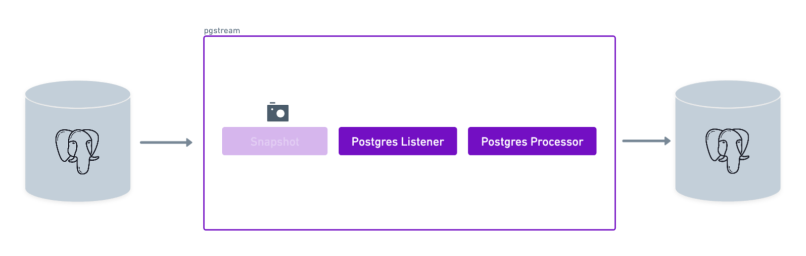
Requirements
- A source PostgreSQL database
- A target PostgreSQL database
- pgstream (see installation instructions for more details)
Demo
Environment setup
The first step is to start the two PostgreSQL databases that will be used as the source and target for replication. The pgstream repository provides a Docker setup for this purpose, but any PostgreSQL servers withwal2json installed can be used.
To start the docker provided PostgreSQL servers, run the following command:
- Source database on port
5432 - Target database on port
7654
Database initialisation
Once both PostgreSQL servers are up and running, initialise pgstream on the source database. This step will create thepgstream schema in the configured Postgres database, along with the tables/functions/triggers required to keep track of the schema changes. See Tracking schema changes section for more details. It will also create a replication slot on the source database which will be used by the pgstream service.
The initialisation step allows to provide both the URL of the PostgreSQL database and the name of the replication slot to be created. The PostgreSQL URL is required, but the replication slot name is optional. If not provided, it will default to pgstream_<dbname>_slot, where <dbname> is the name of the PostgreSQL database. The configuration can be provided either via CLI parameters or environment variables.
For this tutorial, we’ll create a replication slot with the name pgstream_tutorial_slot.
-
Using the
--initflag in theruncommand - Using CLI parameters:
- Using environment variables:
destroy CLI command.
Prepare pgstream configuration
Listener
The listener reads changes from the source database’s WAL. Configure it as follows:Processor
The processor writes changes to the target database. The only required value is the URL of the target database. Configure it as follows:pg2pg_tutorial.env. An equivalent pg2pg_tutorial.yaml configuration can be found below the environment one, and can be used interchangeably.
Validate pgstream status
We can validate that the initialisation and the configuration are valid by running the status command before starting pgstream.
Run pgstream
Run pgstream with the prepared configuration. In this case we set the log level as trace to provide more context for debugging and have more visibility into what pgstream is doing under the hood.
Verify Replication
Schema Changes
-
Connect to the source database:
-
Create a table:
-
Connect to the target database:
-
Verify the table was replicated:
Data Changes
-
Insert data into the source database:
-
Verify the data was replicated to the target database:
Troubleshooting
Here are some common issues you might encounter while following this tutorial and how to resolve them:1. Error: Connection refused
- Cause: The PostgreSQL database is not running or the connection URL is incorrect.
- Solution:
- Ensure the Docker containers for the source and target databases are running.
- Verify the database URLs in the configuration file (
pg2pg_tutorial.env). - Test the connection using
psql:
2. Error: Replication slot not found
- Cause: The replication slot was not created during initialization.
- Solution:
- Reinitialize
pgstreamor manually create the replication slot. - Run the
pgstream statuscommand to validate the initialisation was successful. - Verify the replication slot exists by running:
- Reinitialize
3. Error: Target database does not contain replicated data
- Cause: The replication process did not complete successfully or the target database URL is incorrect.
- Solution:
- Verify the target database URL in the configuration file.
- Check the
pgstreamlogs to confirm the replication process completed without errors. - Query the target database to ensure the data was replicated:
4. Error: Permission denied
- Cause: The database user does not have sufficient privileges.
- Solution:
- Grant the required privileges to the database user:
- Grant the required privileges to the database user:
5. Error: Invalid configuration
- Cause: The configuration file contains invalid or missing values.
- Solution:
- Double-check the
pg2pg_tutorial.envfile for typos or missing variables. - Refer to the pgstream configuration documentation for details on required variables.
- Run the
pgstream statuscommand to validate the configuration is correct.
- Double-check the
6. Error: Snapshot failed
- Cause: The initial snapshot process encountered an issue.
- Solution:
- Ensure the
PGSTREAM_POSTGRES_SNAPSHOT_TABLESvariable is set if a snapshot is required. - Check the
pgstreamlogs for detailed error messages:
- Ensure the
Summary
In this tutorial, we successfully configuredpgstream to replicate data from a source PostgreSQL database to a target PostgreSQL database. We:
- Set up the source and target PostgreSQL databases using Docker.
- Initialized
pgstreamon the source database, creating the necessary schema and replication slot. - Configured the listener to capture changes from the source database’s WAL.
- Configured the processor to replicate changes to the target database.
- Verified that both DML (data manipulation) and DDL (schema changes) were replicated correctly.
pgstream can be used for real-time replication between PostgreSQL databases. For more advanced use cases, such as transformations or webhook integration, refer to the pgstream tutorials.